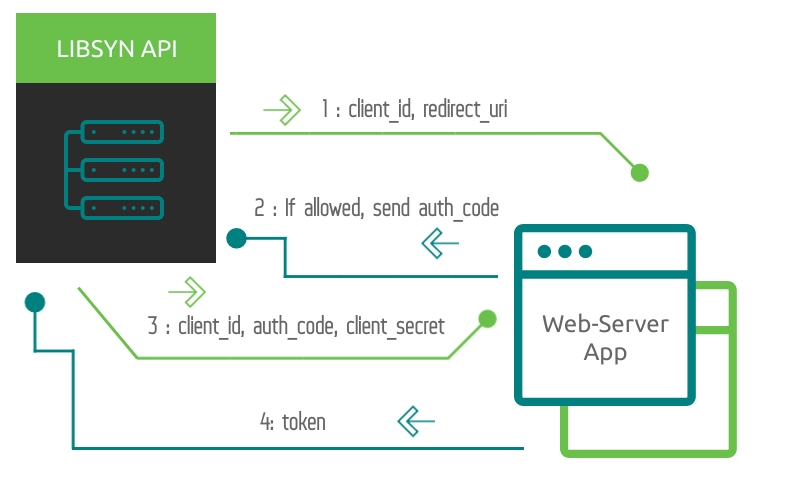
1) Request the authorization code
Using a browser you can request the authorization approval from this page:
https://api.libsyn.com/oauth/authorize?response_type=code&client_id=yourclientid&redirect_uri=http://yourredirecuri.com/blah&state=xyz
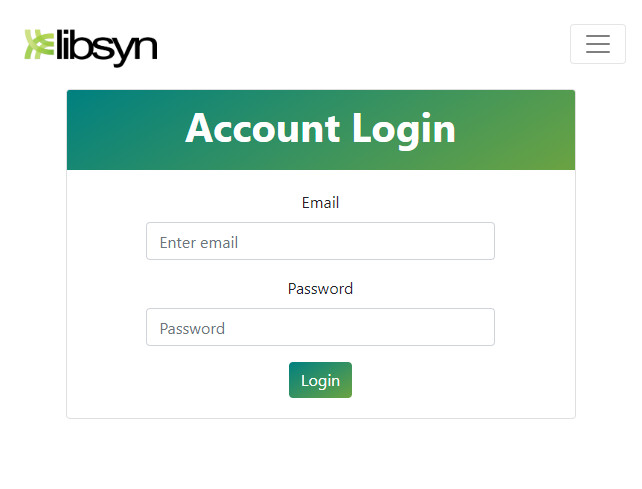
Going to this URL, you will see a web page like the following:
2) Approve the authorization access
Once you are successfully logged in, you will be presented with this confirmation page.
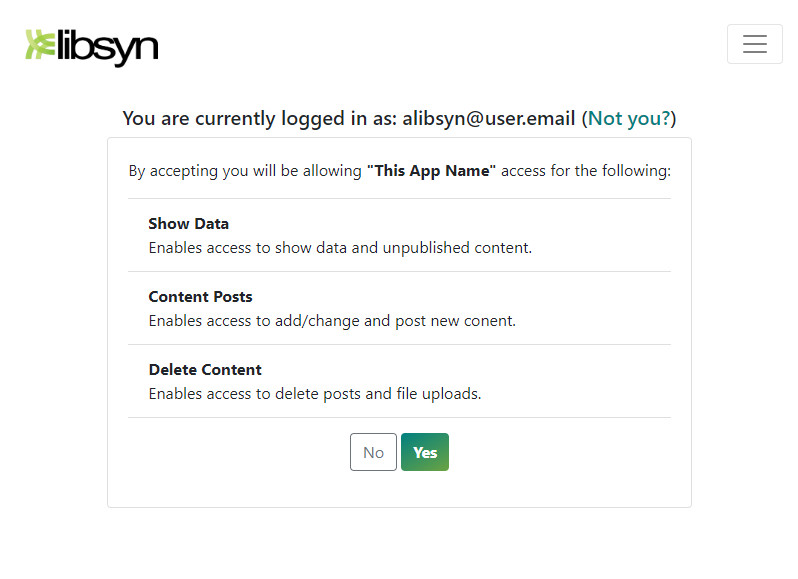
On Authorization the API will redirect to the defined redirect_uri with the parameter code = yourauthorizationcode
3) Request the Bearer token
On Authorization Now that we have the authorization code, we can request the access token by sending this code to https://api.libsyn.com/oauth URI, passing the client_id, the client_secret, and the redirect_uri as shown below:
									POST /oauth HTTP/1.1
									Accept: application/json
									Content-Type:
										application/json
									{
									"redirect_uri":
										"http://yourredirecturi.com/blah",
									"client_id":
										"testclient",
									"client_secret":
										"testpass",
									"code":
										"a4dd64ffb43e6bfe16d47acfab1e68d9c7a28381",
									"grant_type"
										: "authorization_code"
									}
The Libsyn Oauth2 server will reply with the token using a JSON structure like that:
									HTTP/1.1 200 OK
									Content-Type:
										application/json
									{
									"access_token":
										"907c762e069589c2cd2a229cdae7b8778caa9f07",
									"expires_in":
										3600,
									"refresh_token":
										"43018382188f462f6b0e5784dd44c36f476ccce6",
									"scope":
										null,
									"token_type": "Bearer"
									}
Note: You will have 30 seconds to request the access_token
Finally, you can access the API using the Bearer token in the Authorization header of the HTTP request. The following request demonstrates sending the token:
									GET /oauth/resource HTTP/1.1
								Accept:
									application/json
								Authorization: Bearer
									907c762e069589c2cd2a229cdae7b8778caa9f07
Refresh Token
Libsyn OAuth2 protocol gives you the possibility to refresh the access token, generating a new one with a new lifetime. This action can be performed using the refresh_token that the Libsyn API server provides in the response during the authentication step. You can perform a refresh token using the following command:
Note: You will have 30 seconds to request the access_token
								POST /oauth HTTP/1.1
								Accept: application/json
								Content-Type:
									application/json
								{
								"grant_type":
									"refresh_token",
								"refresh_token":
									"the-refresh-token",
								"client_id":
									"your-client-id",
								"client_secret":
									"your-client-secret"
								}
The response will be something like:
								HTTP/1.1 200 OK
								Content-Type:
									application/json
								{
								"access_token":
									"470d9f3c6b0371ff2a88d0c554cbee9cad495e8d",
								"expires_in":
									3600,
								"scope": null,
								"token_type":
									"Bearer"
								}
By default, refresh_token has a lifetime of 28 days and will renew the expiration every time a Libsyn Oauth2 server grant_type : refresh_token is completed; as noted above access_token will expire in 3600 seconds.